Bricks Health
Is your Bricks site ready to ship? Scan it free and find out.
A QA engine for Bricks Builder. It reviews your whole project for design consistency, class hygiene, responsive layout, performance and accessibility. Free on every site with no license key and no signup: the full scan, your Website Health Score, your issue counts, and your worst finding at each severity level in every audit, each one with a working one-click fix. A license reveals every finding and unlocks every Smart Fix.
How it works
Scan
One click reviews every Bricks page: design, classes, responsive behavior, and performance.
Review
Findings are ranked by severity and explained in plain language, with the flagged elements marked right in Bricks or on the live page.
Fix
Apply one-click Smart Fixes that snapshot first, verify the result, and undo cleanly.
A closer look
Real screens from a real site, not mockups.
Everything Bricks Health does
The slider shows the highlights. This is the full list, grouped the way the dashboard is.
Design Consistency
Colours, spacing and typography checked against your own design system.
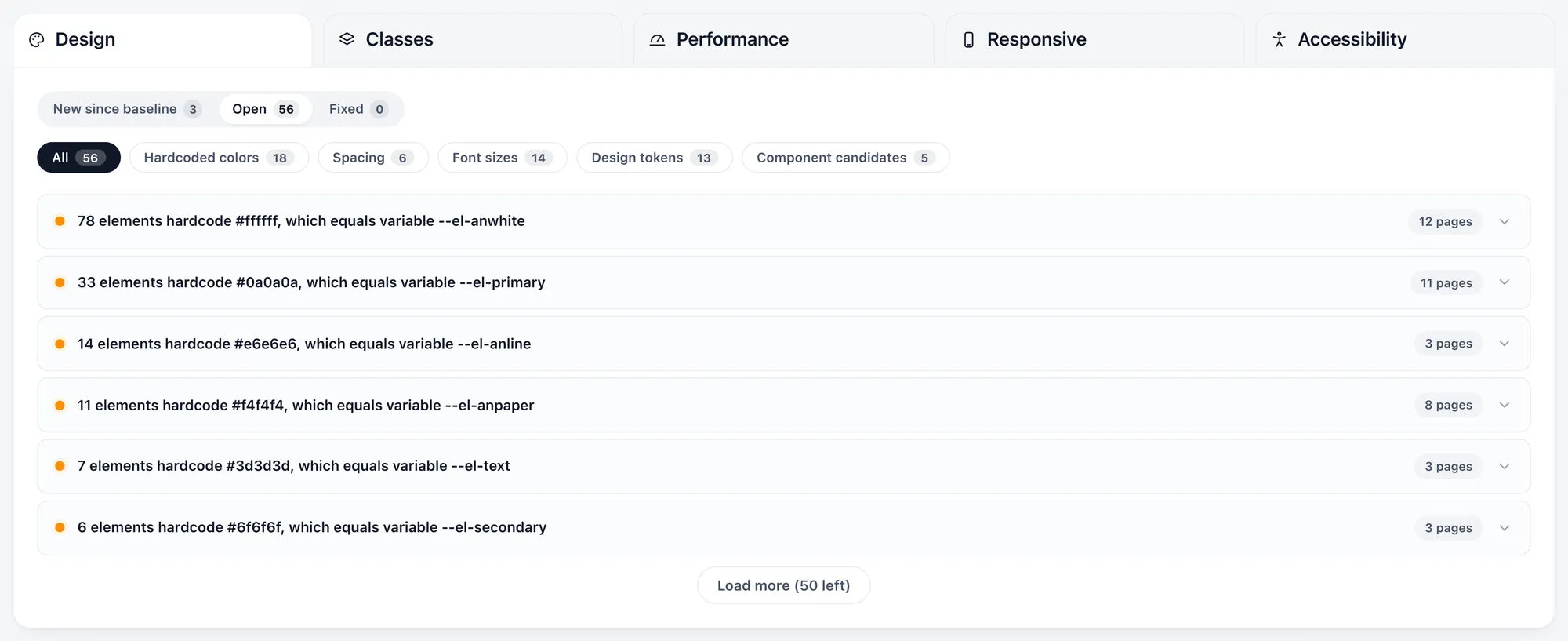
- Hardcoded colours that exactly equal an existing variable, swapped for the variable in one click
- Colours within a few steps of a variable, offered as a review fix
- Hardcoded colours with no variable at all, weighted by how often they repeat
- Off-system spacing, and spacing that varies where it should not
- Hardcoded typography where a global setting already exists
- Two global variables holding the same value
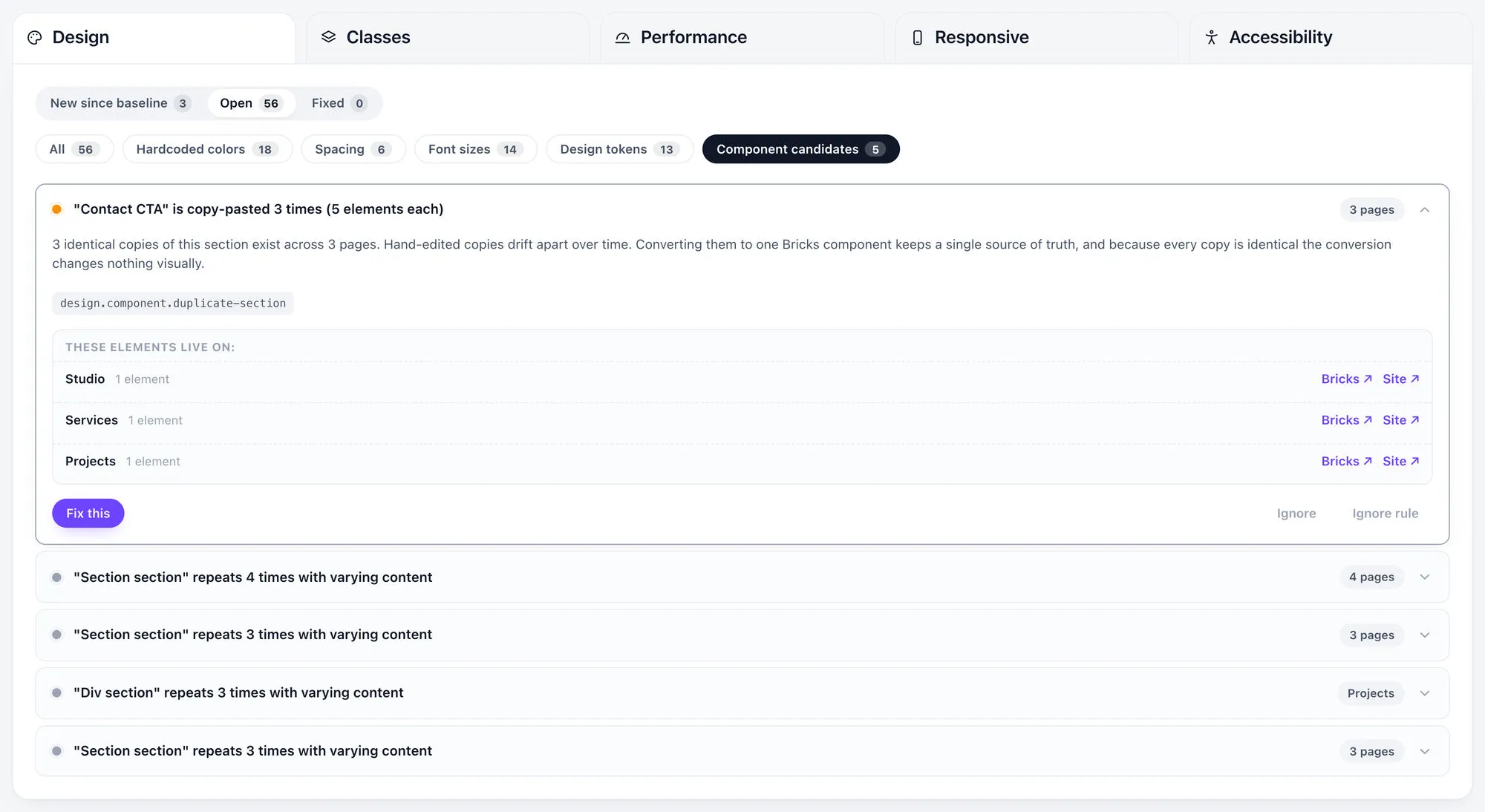
- Sections copy-pasted across pages, converted into one Bricks component with no visual change
- Sections that share a structure but differ in content, listed as component candidates with a link to each
Global Class Intelligence
Reusable styling instead of copy-paste.
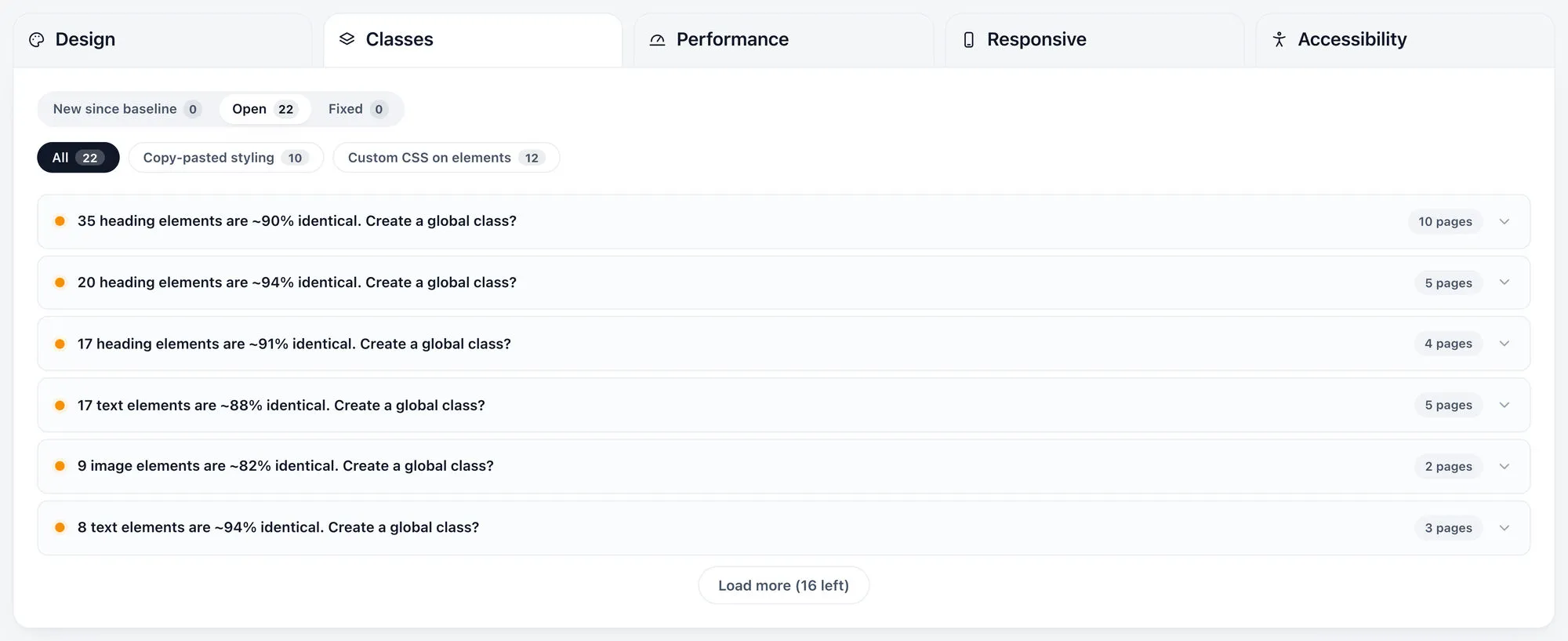
- Elements styled identically across the project, with an offer to consolidate them into one global class
- Duplicate global classes
- Unused classes, and classes used exactly once
- Inline styling that belongs in a class
- Classes that conflict on the same element
- Design-system counts, how many variables, classes and components exist and how many are unused
- Elements carrying their own custom CSS, counted on the Design system card and listed with the page and path of each one, and a link that opens it in the builder
- Automatic.css utility classes are recognised and shown as managed, never reported as unused or single-use
Responsive Layout
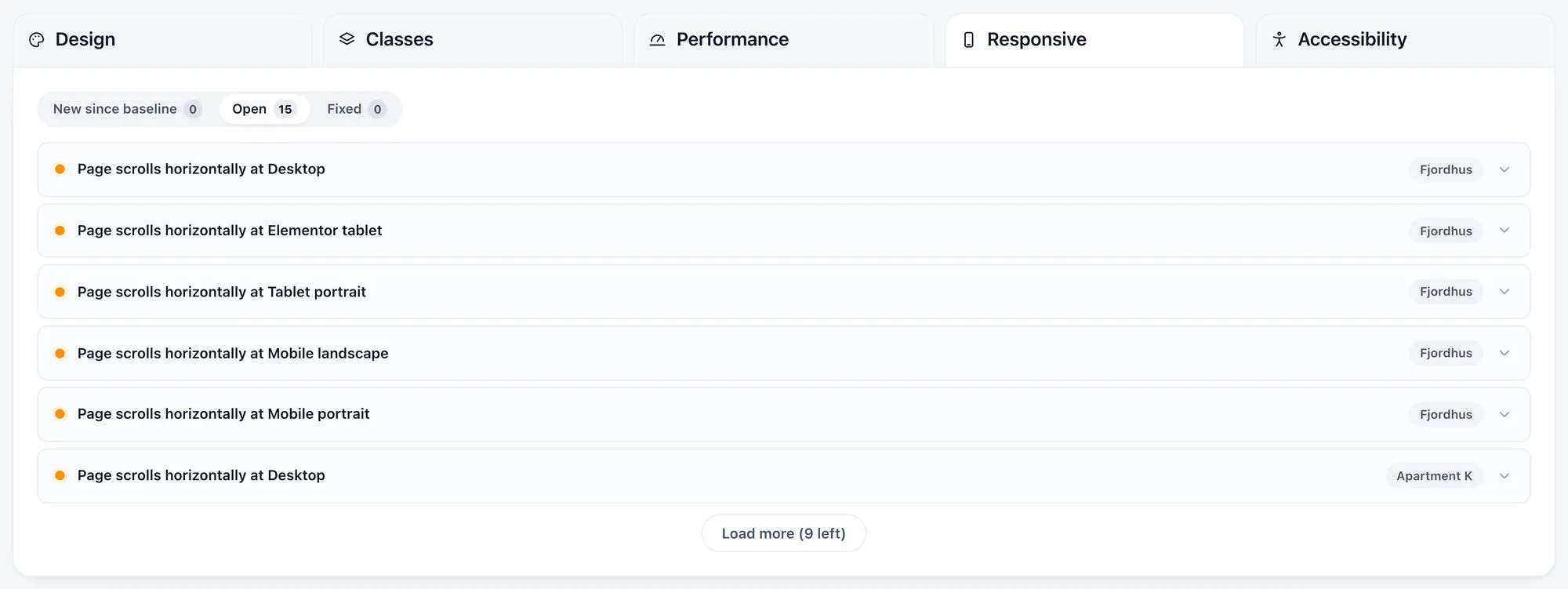
Measured in a real browser at every breakpoint, not guessed from the markup.
- Horizontal page scroll, naming the breakpoint it happens at
- Elements, images and text overflowing their containers
- Clipped elements and oversized gaps
- Tap targets too small for mobile
- Exact measurements on every finding, with sub-pixel spills ignored
- On large sites, the pass samples your most recently edited pages
Performance
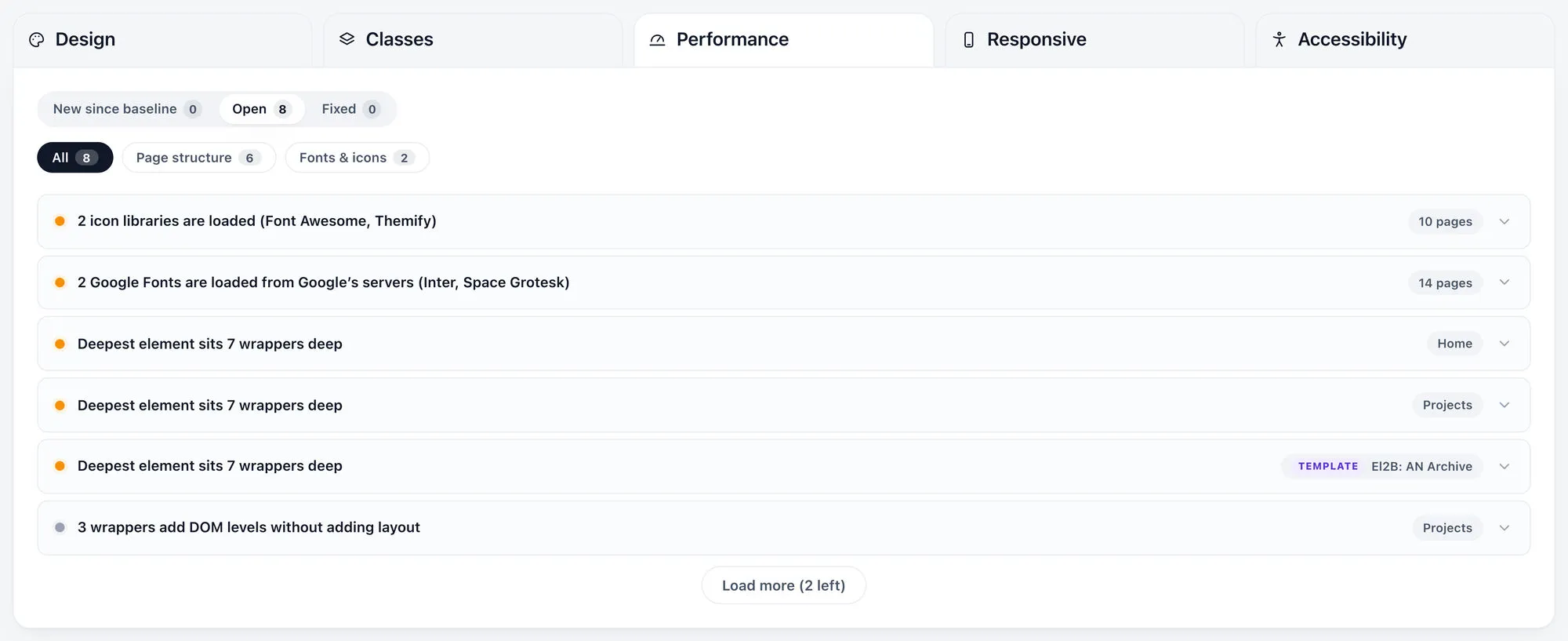
Lean structure, right-sized media, lightweight fonts and icons.
- Oversized images, and images missing their dimensions, the latter fixed in one click
- Deep nesting, excessive wrappers and empty wrappers
- The active theme's own stylesheets and scripts are read before an element is called empty
- A wrapper whose only child is a query or repeater loop is no longer reported as a pass-through
- Autoplaying media
- Query loops with no limit, or a limit far too high
- More than one icon library loading on the same site
- Remote Google Fonts, and more than three font families
- Missing elements and orphaned components
- Unused CSS variables
Accessibility
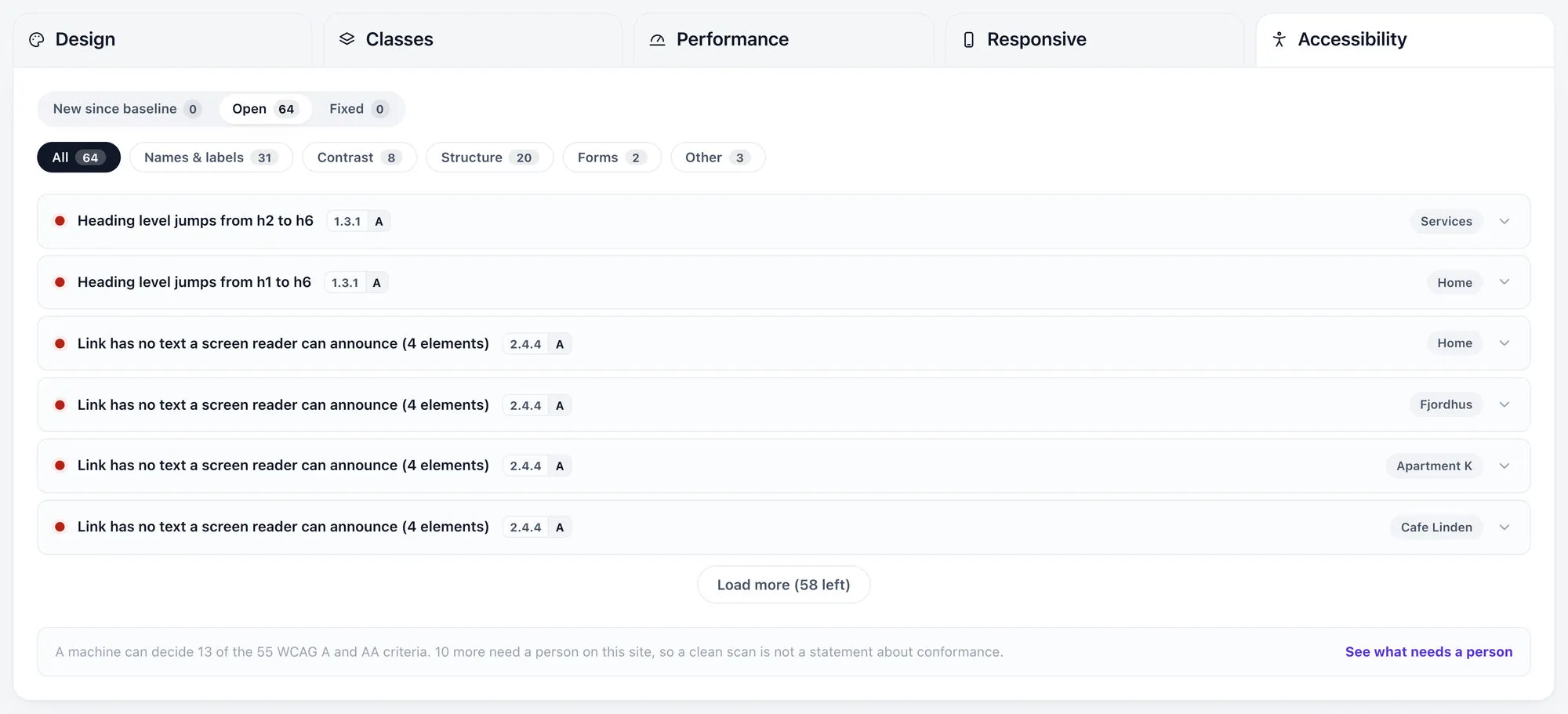
WCAG 2.2 Level A and AA, checked where a machine can decide and named honestly where it cannot.
- 31 checks across 15 criteria, each citing its criterion and level and linking the W3C explanation
- Two passes, one reading your Bricks data on every page, the other measuring the rendered page for contrast, faint borders and missing focus outlines
- Missing alt text, unlabelled controls and form fields, skipped heading levels, positive tabindex, untitled iframes, ARIA misuse
- Link, button and input names, valid ARIA, duplicate IDs, page language, landmarks and skip links
- Target size and reflow
- A permanent panel naming the criteria that still need a person. Nothing in the plugin says compliant or certified
- Videos flagged for a person to check their captions, never reported as failures
Website Health Score
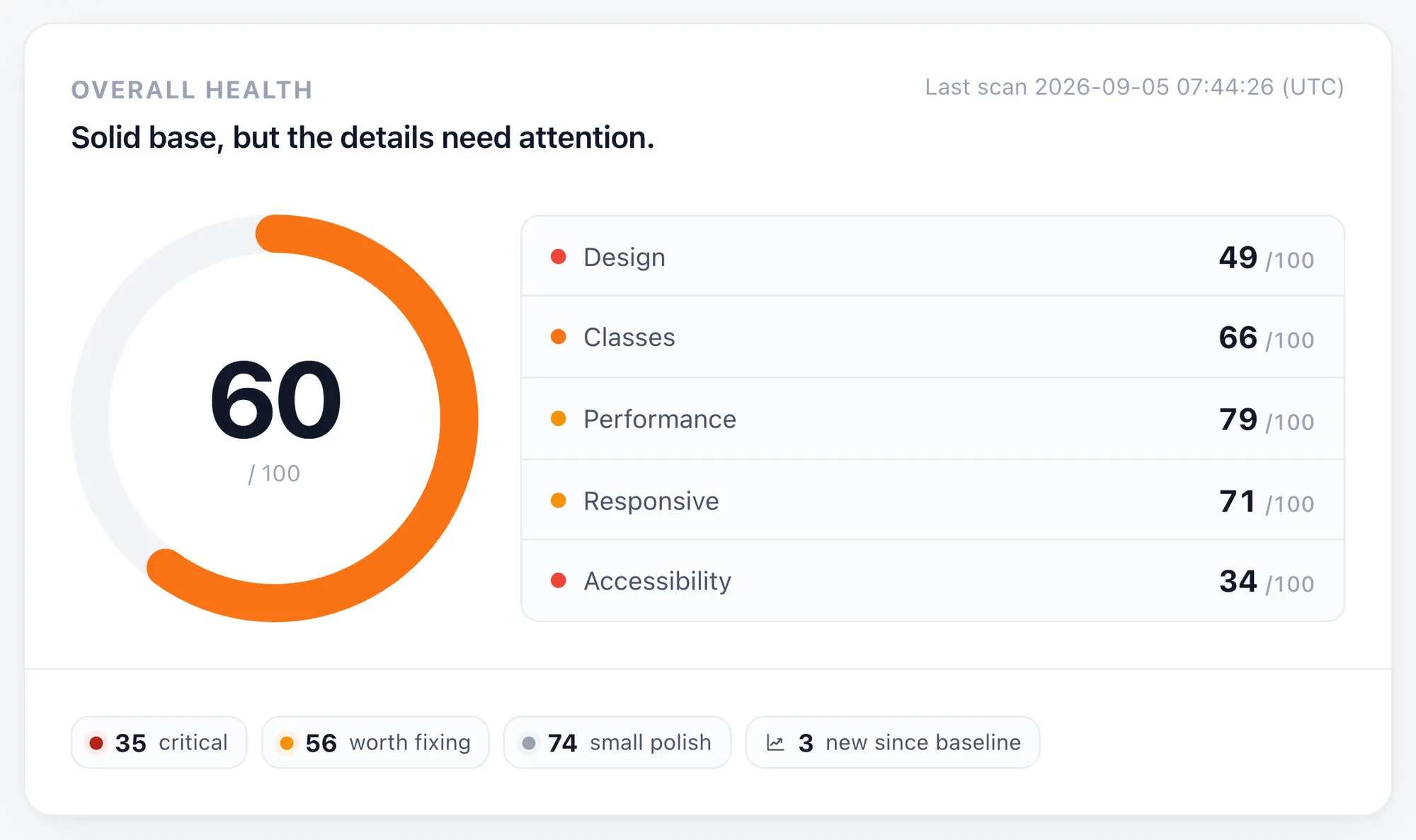
Every finding rolled into one number, plus one per audit.
- One overall score and a score for each of the five audits
- Density-normalised, so the score stays comparable at any site size
- Issue counts by severity and by category
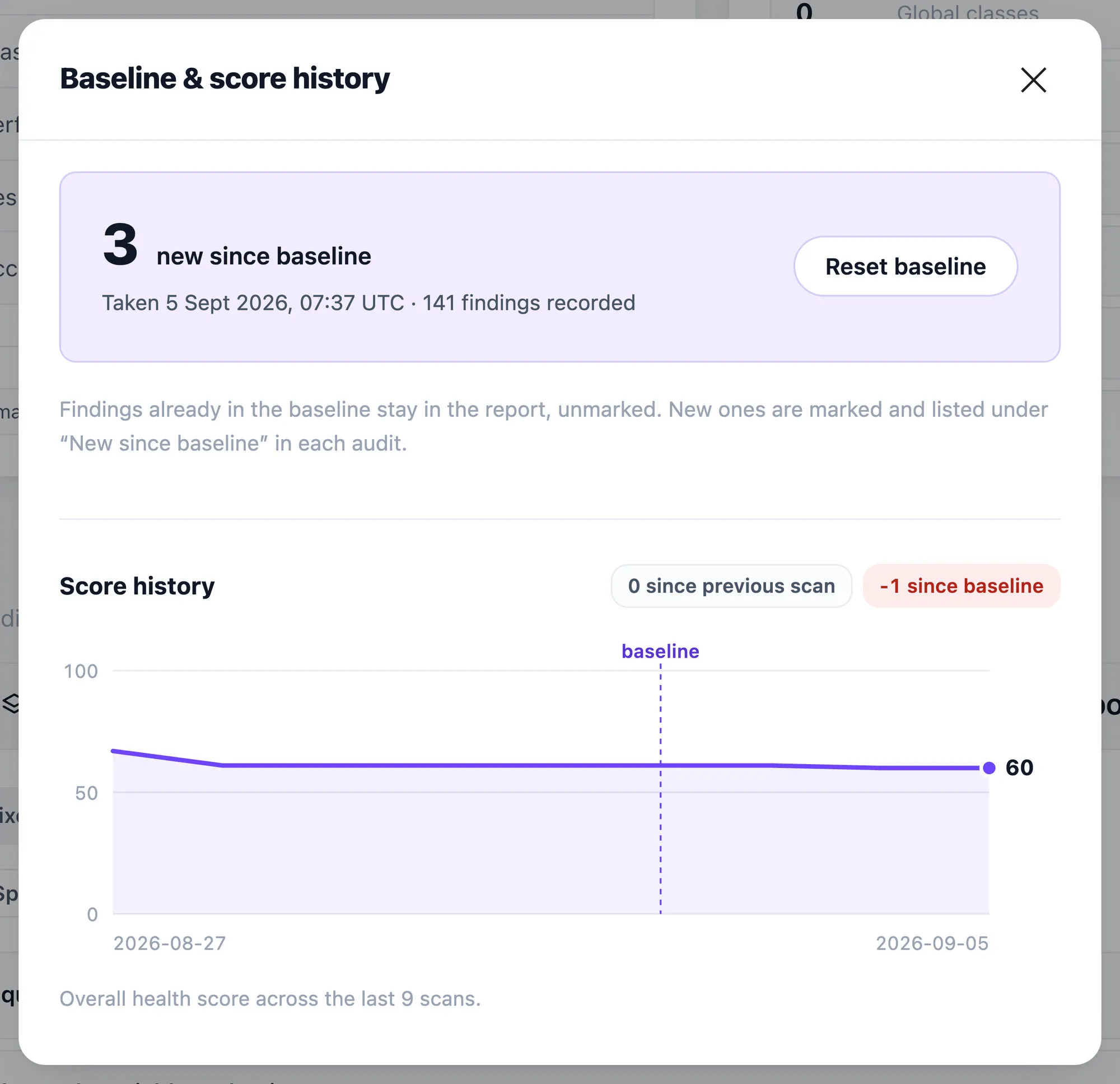
- Scan history, so a project's progress is trackable and showable to a client
- Set a baseline once, and later scans mark only what is new, with a New since baseline tab
- The score trend across recent scans, with the change since the previous scan and since the baseline
- Hover an audit to retarget the ring, click to jump to its findings
Smart Fixes
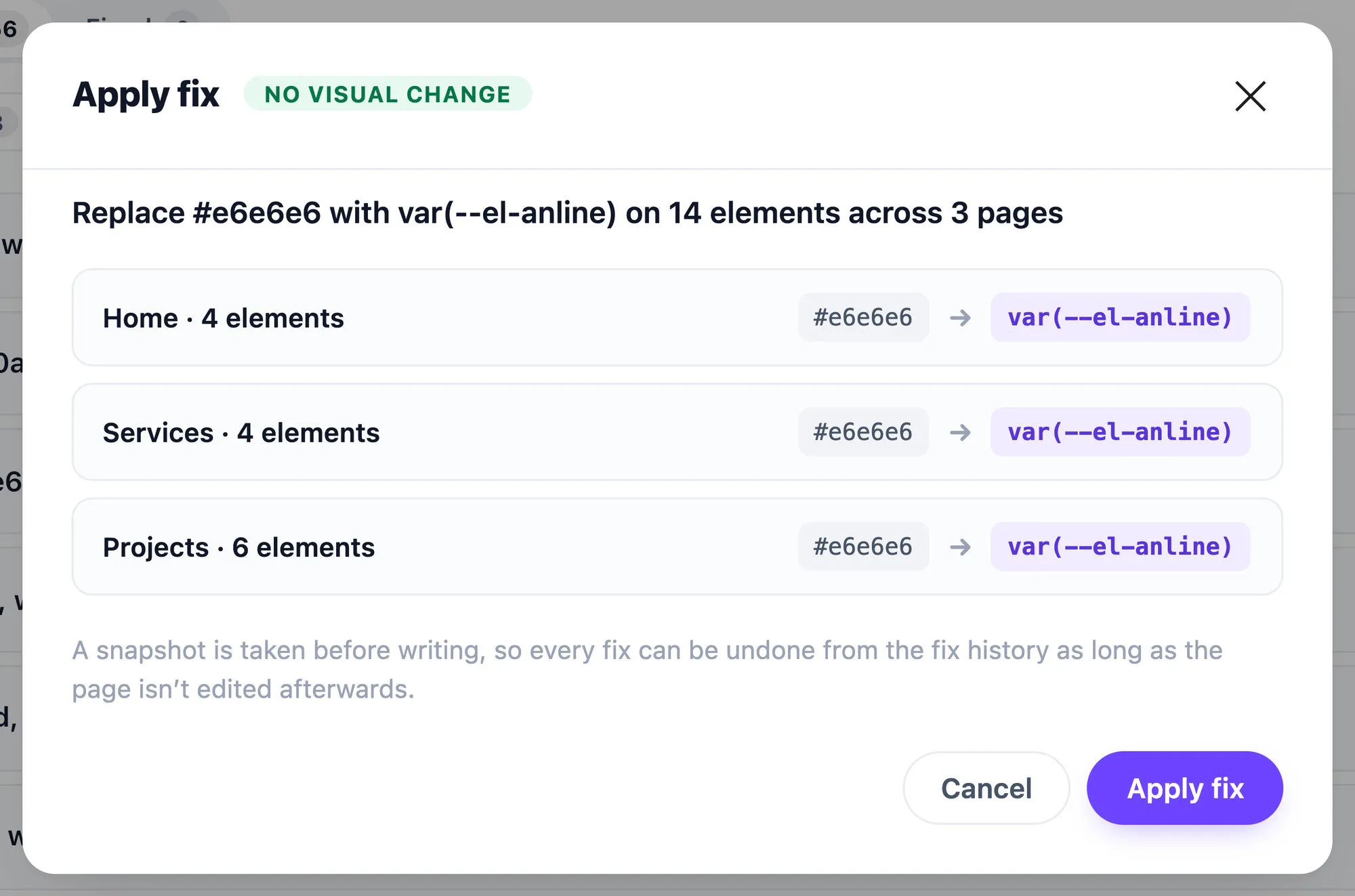
One click, with a snapshot first and a clean undo.
- A preview of every change before it happens, every page, every element, the old value and the new
- Apply a fix to only the elements you tick, with select all and none, and the finding stays open for anything you leave untickedNew in 1.4.3
- Two tiers, safe fixes with no visual change and review fixes that ask you to choose
- Every write snapshots first, and the snapshot is verified before it can be restored
- One-click undo, never gated by a licence
- Undoing a component conversion restores every affected page exactly and removes the component it created
- A site-wide lock, so overlapping applies cannot interfere
- Delete and merge fixes refuse when a class is used in a header, footer or component
- The contrast fix offers only palette colours that pass, labelled with their ratio
- The alt-text fix asks what the image conveys, with decorative as a real answer
- A global kill-switch for all writes, which forces itself on for a Bricks version this release has not been verified against
- New installs start read-only, and the fix dialog turns writing on in one action the first time you apply a fix
In the builder
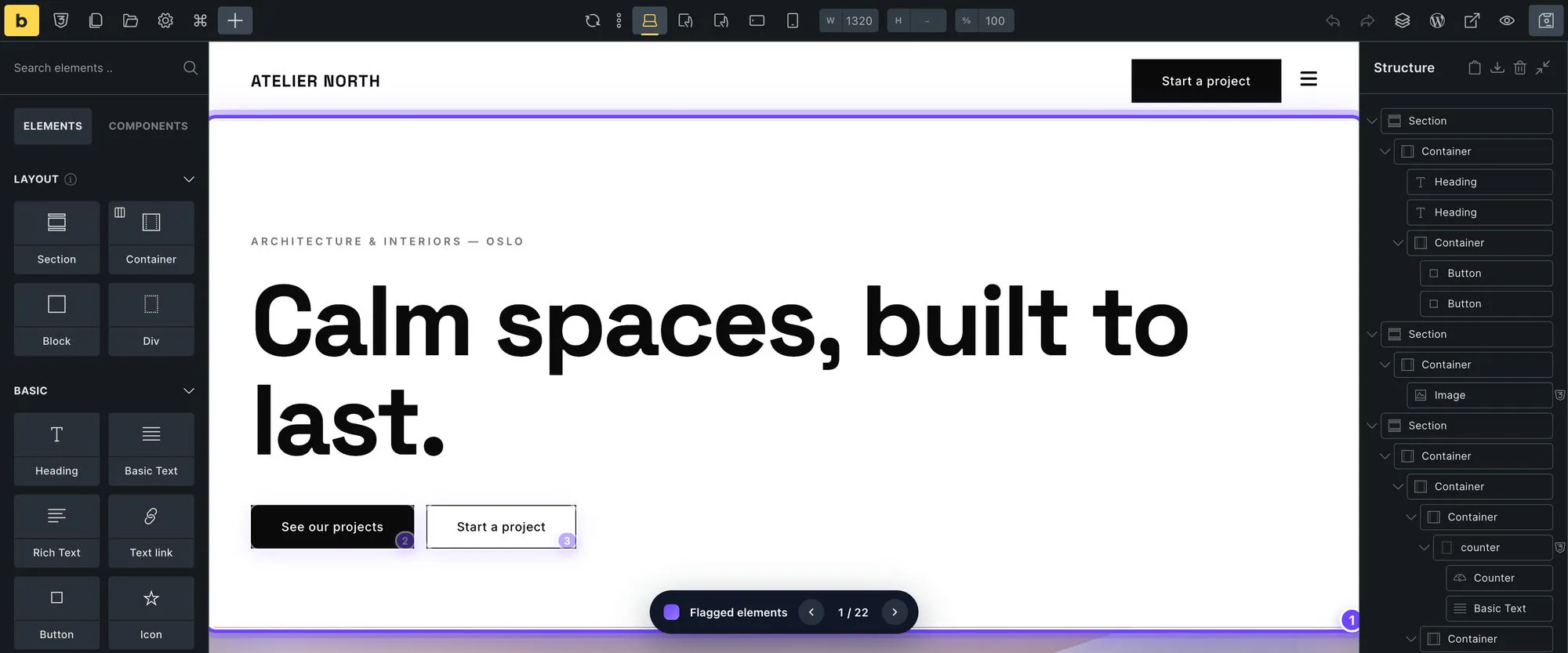
From a finding straight to the element.
- Every finding deep-links into the Bricks builder
- Flagged elements are marked and numbered on the canvas, with a navigator to step through them
- Marks survive Bricks re-rendering an element, and the builder's own selection outline steps aside
- The new component appears in the builder's Components panel
Free on every site
The verdict is free. The deliverable is licensed.
- The full scan, all five audits, the score and the issue counts, free on every site with no key and no signup
- Your worst finding at each severity level, in every audit, revealed in full with a working Smart Fix
- A licence reveals every finding, retroactively, on scans you have already run
- If a licence lapses, scans keep running and findings, scores and undo history never lock
- Scan progress persists and survives timeouts, and Stop aborts instantly
- A License and Account screen with a support details block you can copy into a ticket, nothing sent anywhere on its own
- Uninstall removes every option, transient and capability, with an option to delete all plugin data
All 66 checks are documented in the rule reference, each with its severity and whether it has a one-click fix. Read the rule reference
Bricks Health answers one question: is this Bricks site actually ready to ship?
It looks past “does it render” at how the thing is actually built. Colours hardcoded where a variable already exists. Elements styled identically that should share one global class. Layouts that overflow on a phone. Pages carrying weight nobody asked for. Text nobody with low vision can read. The same section copy-pasted onto six pages when it should be one component. Then, where it’s safe, it fixes the problem for you and keeps a full undo history, so you can trust it on real client work.
Why choose Bricks Health?
Safe by design
Every Smart Fix snapshots your page first, verifies the result, and undoes with one click. New installs start read-only, and the first fix you apply turns writing on in one action. A global kill-switch can disable all writes at any time.
Yours to keep
A yearly per-site license, or a one-time lifetime while the founding offer runs. If a yearly license lapses you drop back to the free tier rather than losing access: scans keep running, and your findings, score and one-click undo never lock.
14-day money-back guarantee
Not working out? Email us within 14 days of purchase and we'll refund you in full, no questions asked. If you'd like us to try to fix it first, we will, but you don't have to.
Pricing
Free
Every site, no limit
- Full site scan, all five audits
- Website Health Score, plus a score per audit
- Findings: Worst 1 per severity, per audit
- Smart Fixes: On revealed findings
- One-click undo, never gated
Solo
1 site
- Full site scan, all five audits
- Findings: Every one revealed
- Earlier free scans unlock retroactively, with no re-scan
- Smart Fixes: On every finding
- Automatic updates in WordPress
Studio
Most popular5 sites
- Full site scan, all five audits
- Findings: Every one revealed
- Earlier free scans unlock retroactively, with no re-scan
- Smart Fixes: On every finding
- Automatic updates in WordPress
Agency
Unlimited sites
- Full site scan, all five audits
- Findings: Every one revealed
- Earlier free scans unlock retroactively, with no re-scan
- Smart Fixes: On every finding
- Automatic updates in WordPress
- Lifetime until September 20, 2026Every paid tier is shown as a one-time lifetime price, with updates for as long as we offer it; switch the toggle above to Yearly for the subscription instead. A founding offer: the lifetime option comes off this page on September 20, 2026.
- 14-day money-back guaranteeOn any paid plan. Email us within 14 days of purchase and we'll refund you in full, no questions asked. If you'd like us to try to fix it first, we will, but you don't have to. The free plan has nothing to refund.
- Prices exclude VATLemon Squeezy calculates VAT at checkout from your billing country. EU businesses can enter a VAT number to have it reverse-charged.
Pair it with Bricks Migration Engine
The Built For Bricks Suite: both plugins, lifetime, on unlimited sites, and save $194, until September 20, 2026.
- WordPress
- 6.5 or newer
- PHP
- 8.1 or newer
- Bricks
- 2.3 or 2.4
On any other Bricks version it keeps scanning and scoring as normal, and Smart Fixes switch to read-only until we have verified that version. Nothing on your site is written by a version we have not checked.
Frequently asked questions
Is Bricks Health available now?
Yes. Install it and scan any site for free, with no license key and no signup. A paid license reveals every finding and unlocks every one-click Smart Fix.
What do I get for free?
The whole verdict. A free install scans your entire site, gives you your real Website Health Score and a score for each of the five audits, tells you how many issues it found by severity and by category, and counts your design system for you: how many variables, classes and components exist, and how many are unused. It also unlocks your worst finding at each severity level, in every audit, in full, and lets you apply each one's one-click Smart Fix, snapshot and undo included, so you can judge the quality of the advice before you spend anything. What a license buys is the rest of the list.
Is the free version crippled or time-limited?
Neither. There is no trial clock, nothing expires, and there is no cap on sites or scans. The free scan is the same scan the paid version runs, and the score and counts it shows are the real ones, not samples or estimates. Two honest limits, so nothing surprises you: the unlocked findings are your worst at each severity level in each audit, for the life of the site, not a fresh set on every scan, and automatic updates need a license, so free installs update by downloading the current version from this page.
Where is my license key?
In your Lemon Squeezy receipt, on a line starting 'License key:' below the order total, and on your order page at app.lemonsqueezy.com/my-orders. It is 36 characters with hyphens. If you cannot spot it, this page shows exactly where to look and what to do if the receipt is gone: https://builtforbricks.com/license/
If I buy later, do I have to scan again?
No. Activating a license reveals every finding from the scans you already ran, immediately and with no re-scan. Nothing was ever withheld from your database, only from the screen, so the moment your key is valid the full list is simply there.
What is Bricks Health?
Bricks Health is a QA engine for Bricks Builder. It scans your whole project for design consistency, class hygiene, responsive behavior, performance and accessibility, rolls everything into a single Website Health Score, and fixes many of the findings in one click.
Does the Accessibility audit make my site compliant?
No, and be wary of any tool that says it does. Automated checking can decide 13 of the 55 WCAG 2.2 A and AA criteria outright; the rest depend on meaning, intent or interaction, and no software can judge them. So Bricks Health checks what a machine can verify, cites the exact criterion and level for every finding, links the W3C's own explanation of it, and then shows you a permanent panel naming the criteria that still need a person on your site, based on the content it actually found. A clean scan is not a statement about conformance, and the plugin never presents it as one.
What does the Accessibility audit actually check?
WCAG 2.2 Level A and AA, across two passes. One reads your Bricks data, so it covers every page: missing alt text, skipped heading levels, unlabelled form fields, positive tabindex, untitled frames, ARIA that does not exist. The other loads your pages in a real browser, because some things can only be measured as painted: colour contrast against the background actually rendered, faint form-field borders, focus outlines removed with nothing put back, duplicated ids that ARIA points at. Six of the findings have one-click Smart Fixes; the full rule list with every criterion is in the docs.
Can it turn repeated sections into components?
Yes. Bricks Health finds sections you have copy-pasted across pages. Where the copies are identical, one click converts them into a single Bricks component and it appears in the builder's Components panel, with no visual change to your pages. Where sections share a structure but differ in their content, they are listed as candidates with a link to each one, and deliberately not converted for you, because that would overwrite what each page actually displays. One thing to know before you convert: it replaces each copy's inner elements, so their `#brxe-` IDs change, and any anchors or custom code pointing at those exact IDs need updating.
Which Bricks and WordPress versions are supported?
Bricks Health is built and verified against the Bricks 2.3 and 2.4 lines, WordPress 6.5+, and PHP 8.1+. When a new Bricks version ships, Smart Fixes automatically switch to read-only until we verify the update is safe, scans keep working, and your data is never touched by an unverified version.
Can Smart Fixes break my site?
Every fix snapshots the page first, applies the change, verifies the result, and can be undone with one click from the history panel. New installs start read-only, and the first fix you apply turns writing on in one action. There is also a global kill-switch that disables all writes at any time. You review and apply each fix yourself; nothing ever changes on its own.
How many sites can I use it on?
The free scan has no site limit at all, install it wherever you like. For paid plans it depends on your tier: Solo covers one site, Studio five, and Agency is unlimited. You can deactivate a license and move it to another site whenever you need, and a WordPress multisite network counts as one site however many subsites it has.
What happens when my license expires?
Your site drops back to the free tier. It never locks. Everything you scanned while licensed stays open in full, every finding, and one-click undo is never gated, so nothing you've already done can be held back. New scans keep running too, in free mode, giving you your score, your issue counts and your worst finding at each severity level in every audit. What pauses is Smart Fixes on your licensed findings and automatic updates, both of which resume the moment you renew.
Do you offer refunds?
Yes, a 14-day money-back guarantee. If Bricks Health isn't working out, email us within 14 days of purchase and we'll refund you in full, no questions asked. If you'd like us to try to fix it first, we will, but you don't have to.
Does it slow down my website?
No. Bricks Health runs entirely in the WordPress admin and adds nothing to your public pages, so there is zero impact on what your visitors load.
Ready to ship a healthier Bricks site?
Join the newsletter
New tools, product updates, and the occasional Bricks tip. No spam, unsubscribe anytime.
Help shape the roadmap
Here's what we're weighing for after launch, upvote what you want most and it moves up the list. One vote each; change your mind anytime.
Redundant-style cleanup
Find local styles that just repeat your Theme Styles and clear them in one click.
Client-ready reports
Export a branded PDF audit for handoffs and agency retainers.
AI workflow integration
“AI builds, Bricks Health verifies”, scan and fix straight from Bricks 2.4 AI tools.
Have an idea?
Bricks Health is shaped by the people using it. Tell us what you'd like it to do next, and the most-requested ideas move up the roadmap.
Prefer email? Write to support@builtforbricks.com.