Migration guide
Elementor to Bricks: how to migrate without rebuilding your site
The received wisdom is that moving a site from Elementor to Bricks means rebuilding it by hand. That was true for a long time. This is what actually changed, what a migration involves now, and what it costs either way.
The short version
- Teams leave Elementor for three reasons: editor speed on complex pages, markup that is hard to hand off, and an annual fee for layout control they could own outright.
- A manual rebuild is the usual route, and agencies who sell it publish figures in the $5,000–$15,000 range over two to four weeks for a 50-page site.
- Automated conversion earned a bad reputation early on, but the current tools (paste-a-section converters and AI agent skills alike) do emit native Bricks structure. The question worth asking now is not is the output clean but how much of my site does it cover.
- Scanning and previewing your own site costs nothing and changes nothing, so you can answer "would this even work on my site?" before spending anything.
- Up to 90% of a site converts automatically. Third-party widget packs still need a human. The useful question is how short that list is on your site.
Why teams leave Elementor
Almost nobody switches page builders because they read a comparison table. They switch because something specific got in the way often enough to be worth the disruption. In practice it is one of three things, and usually all three at once.
1.The editor slows down exactly when the page gets interesting
A five-section landing page is fine in any builder. The pain starts on the page that pays the bills (the long one, with nested columns and a dozen widgets) where the panel starts lagging behind the click. Bricks' editor has been Vue-based since it launched in 2021, with a render-logic overhaul in 2.0, and reviewers consistently describe it as fast on exactly those pages.
2.The markup is hard to hand off
Open the inspector on an Elementor V3 page and count the divs between the section and the heading inside it. Someone coined "divception" for it, and the name stuck because everyone recognised the shape. The page weight is the smaller half of it. The real cost is that the site becomes awkward to hand to another developer, and awkward to restyle without fighting generated CSS.
3.You are renting layout control you could own
Elementor Pro is an annual subscription. Bricks sells a lifetime license. Over a five-year client site (the kind you built once and still maintain) that difference compounds, and it changes what happens when a renewal lapses on a site you no longer actively bill for.
None of these are reasons to panic-migrate a site that is working. They are reasons the next site, and eventually the back catalogue, ends up somewhere else.
Elementor vs Bricks, compared
One caveat before the table, because most comparisons skip it: Elementor's V4 editor went stable in March 2026 and it genuinely narrows the markup and styling gap: it adds native CSS classes and variables and emits fewer wrappers. But it is opt-in per site, so the Elementor site you are looking at right now almost certainly still runs the older architecture. The row below says so rather than pretending V4 does not exist.
What the markup actually looks like
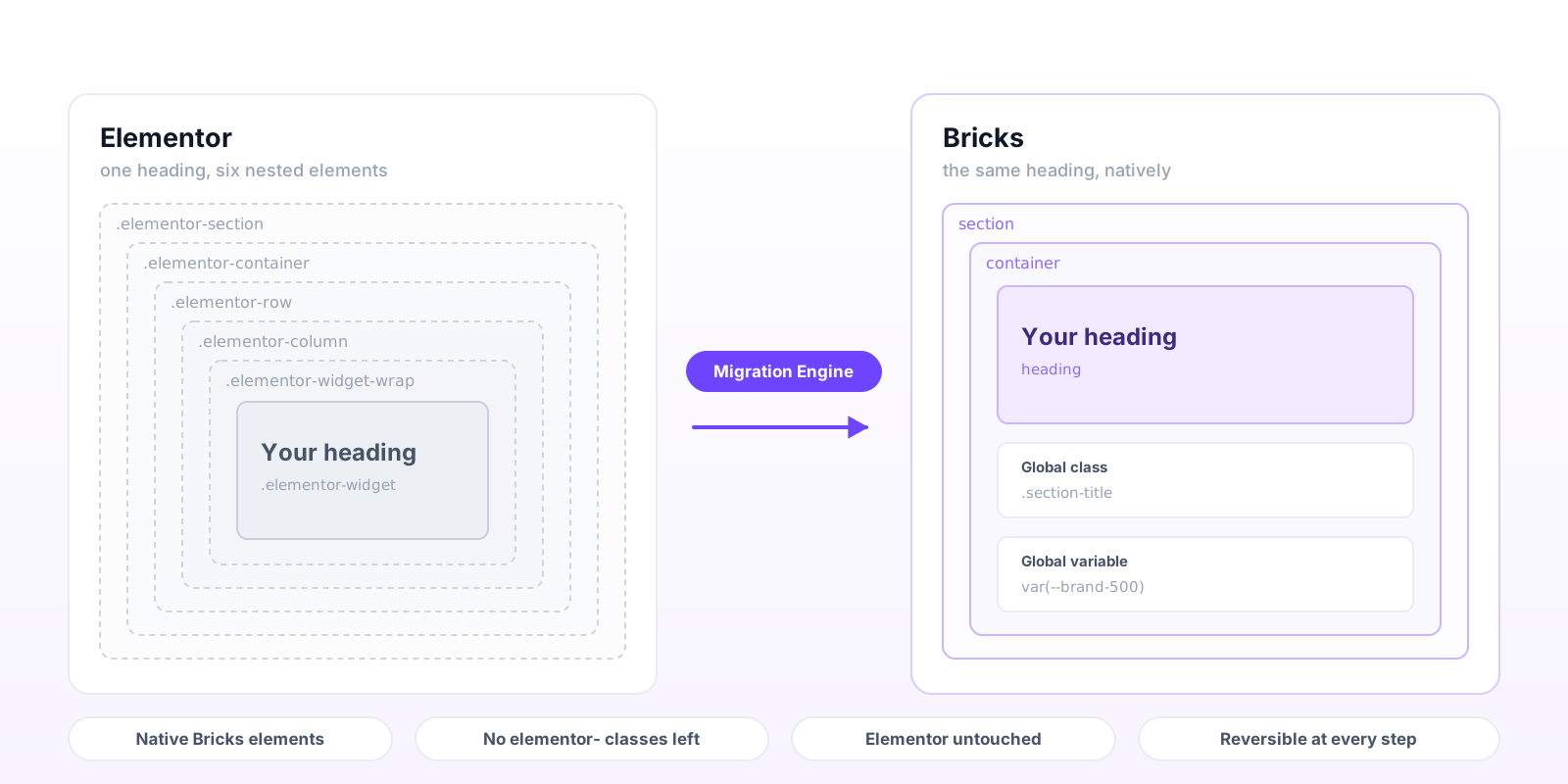
The image at the top of this page is not an exaggeration. On a V3 Elementor page, a single heading typically sits inside a section, a container, a row, a column and a widget wrapper before you reach the element you actually placed. Each layer is a real DOM node with real generated CSS attached to it.
That is why "just convert it" produced disappointing results for years. A converter that maps each Elementor div to a Bricks div preserves the nesting perfectly, and gives you a Bricks site with Elementor's structure inside it. You have changed the builder and kept the problem.
In fairness, that is no longer what the field looks like. The current crop (the free paste-a-section converters and the AI agent skills alike) read Elementor's JSON and emit real Bricks elements, so the output is genuinely native. Clean structure has stopped being the thing that separates these tools. What separates them is how much of a site each one can see at once, which is the next section.
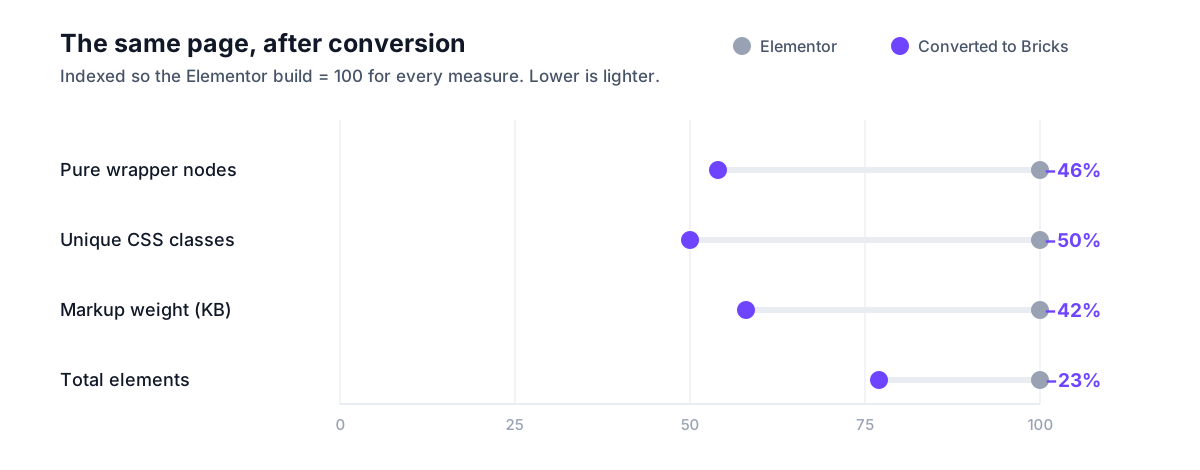
The measurable test is what the converted page weighs. Here is one real site we converted, a WooCommerce build, homepage, measured on both renders of the same content:
A ten-second check worth running anyway
Whatever you convert with, open the result and search the source for elementor-and e-con. If they survived, the page is Elementor markup wearing a Bricks badge and every reason you switched is still in the HTML. On the site measured above, zero survive, the only shared classes are WooCommerce's own, which both builders use because WooCommerce emits them.
Treat this as a floor rather than a verdict. The serious tools all pass it now. It is worth thirty seconds because it is the one thing you can check without reading anybody's documentation.
Every way to convert, compared
Search this topic and you will hit the same sentence on article after article: there is no clean converter, the tools that claim to do it make a mess, and a migration is therefore a rebuild. That was accurate when it was written, and the people writing it were not being cynical, most are agencies who tried the tools and then quoted the rebuild.
It has aged badly, though, and anyone repeating it today is describing a field that has moved. There are now four distinct ways to do this, and they fail in completely different places. The honest way to choose between them is to stop asking which is best and start asking how much of your site each one can actually see.
The free paste-a-section converters are genuinely useful and worth knowing about. If you want to move one hero, one pricing table, one section you are fond of, they will do it in about a minute for nothing. They are not trying to be a site migration and it is not a criticism to say they are not one.
The AI agent skills are the interesting comparison, because they work the same way we do (read Elementor's JSON, map each widget, write Bricks JSON) and they produce good page content. Respira's skill documents its own boundaries clearly, which is to its credit: roughly 80–90% of standard widgets, and no Theme Builder templates, popups, WooCommerce widgets, Pro dynamic tags or ACF displays. Those exclusions are not a bug in their tool; they are the line between convertingpages and converting a site. On most real projects the headers, footers, archive templates and popups are where the work actually is.
There is also a determinism differenceworth understanding before you pick. An engine maps widgets with fixed rules, so the same page converts the same way every time and a mistake is a bug someone can fix for everyone. An agent reasons about each page as it goes, which is exactly why it can improvise around something unusual, and also why two runs of the same page can differ, and why a sixty-page site is sixty separate acts of judgement. Neither property is universally better. They suit different jobs, and it is worth knowing which one you are buying.
And a cost structure worth doing the arithmetic on. A migration is work you do once per site. Both AI-based approaches bill annually for the plugin itself, and neither runs on its own, each needs a separate AI agent subscription underneath it (Claude, Cursor, Codex or similar, billed by that provider) before it does anything at all. That is two recurring costs stacked under a one-time job, and the meter keeps running in any year you are not actively migrating something. The Bricks Migration Engine is the only one-time purchase in this comparison: pay once, and there is nothing else required to run it.
How a migration actually runs
The order matters more than any single step, because the first stage is read-only. You can get most of the way to a decision without changing a byte on your site.
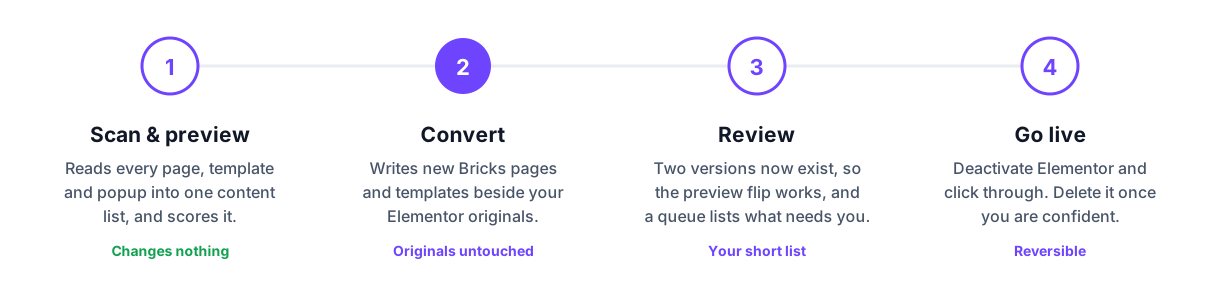
Scanning changes nothing. It reads your pages, templates and popups into a single content list and returns a coverage figure, the percentage of this specific site that converts automatically. That number is the honest answer to "will this work for me", and it is free and unlimited whether you have bought anything or not. Worth knowing what this stage can't show you: there is no Bricks version to look at yet, so the front-end preview has nothing to flip to until you convert.
Converting is additive, not destructive.New Bricks pages and templates are written alongside your Elementor originals. Your live site keeps serving Elementor until you decide otherwise, which means there is no window where visitors see a half-migrated page.
The review queue is the actual work.Anything that cannot map one-to-one is collected into a list (the widget, how many instances, and why) with a link to open that page in Bricks. This is also the first point where the front-end preview earns its keep: with two versions of the site now sitting side by side, flipping between them shows you a real comparison. This is where your hours go, and the queue's length is the real measure of how much a migration costs you.
Going live is a switch, not a deploy.Deactivate Elementor and Elementor Pro, click through the site, and delete them once you are confident. Neither step touches your Elementor data, and any page can be rolled back individually if something looks wrong.
What carries over, and what needs you
A converter that claims everything is a converter you should not trust. Our number isup to 90% of a site converting automatically. The way to find out where your own site lands is the free coverage scan. It reads your project and reports the real percentage before you spend anything. The list below is the shape of the split.
Converts automatically
- Every page built with Elementor
- Saved templates: sections, containers, pages
- Theme Builder: headers, footers, single, archive, search, 404
- Popups and floating bars, with their display conditions
- WooCommerce: shop, product, cart, checkout, thank-you and account pages
- ACF fields and dynamic data bindings
- Hover states and transitions, as native Bricks hover states you can still edit
- All 36 Elementor entrance animations, as Bricks interactions with their timing
- Global colours, fonts and breakpoints, as Bricks variables
- Your SEO: same URL, and your SEO plugin’s titles, meta, canonicals and schema left untouched
- Stored form submissions from the forms you convert, copied into Bricks in one confirmed click
- Sidebar widget areas: the element converts, and your widgets stay in place across the theme switch
Lands on your review list
- Third-party widget packs: Essential Addons, JetElements, Crocoblock and friends have no Bricks equivalent to map onto
- Anything custom enough that a one-to-one mapping would be a guess
The third-party widget problem is worth understanding rather than resenting, because no tool can solve it. A JetElements slider is proprietary code with its own settings schema; there is no Bricks element that is the same thing, so any converter guessing at an equivalent would be inventing a design decision on your behalf. Being told which twelve elements need a human is more useful than being handed twelve silent approximations.
What it costs
This is the question most people actually arrive with, and the published numbers come almost entirely from firms selling manual migrations, which makes them a fair upper bound and worth naming rather than paraphrasing.
The comparison is not quite like-for-like, and pretending otherwise would be dishonest. An agency rebuild includes someone else doing the review work, making the judgement calls on the widgets that did not map, and testing the result. Converting the site yourself means you do that part. What changes is the size of the job: reviewing a migration is a different order of work from rebuilding sixty pages by hand.
Three situations this comes up in
The right approach depends less on the size of the site than on what is forcing the decision. These are the three shapes this question usually arrives in.
The agency with a back catalogue
Fourteen client sites on Elementor Pro, fourteen renewals, and a growing suspicion that you are administering subscriptions rather than building. The move here is not to migrate fourteen sites. It is to migrate one (ideally a mid-complexity site you know well) and use it to find out what your review queue actually looks like, because your sites were probably built with the same habits. That first migration is the estimate for the other thirteen.
This is also the case where the page-by-page tools stop scaling. Supervising an AI agent through one page is a pleasant afternoon; doing it fourteen times across a few hundred pages, and rebuilding every header, footer and archive template by hand afterwards, is a project.
The 60-page marketing site
The one where a rebuild quote came back in weeks rather than days. The thing that makes these expensive to rebuild is rarely the design, it is re-entering sixty pages of copy and imagery without losing a paragraph, then reconciling what the client changed while you were working. Conversion sidesteps that entirely, because the content is never re-entered; it is read from the pages you already have.
The WooCommerce store
The hardest of the three, not because anything is unbuilt but because there is more of it to review. Shop, single product, cart, checkout, thank-you and account pages all convert. Checkout specifically becomes a real Bricks checkout template rather than a plain page, because that's the only way the form has something to submit into. The single-product fields (price, stock, rating, description) carry across pixel for pixel; the archive grid, cart and account screens convert correctly in content and structure but come with known styling differences the engine flags for a review pass. Budget time for that pass: a store migration has more surface than a marketing site, not more risk.
Bricks Migration Engine pricing
Scanning, the coverage report and the front-end preview are free and unlimited on any site. Conversion is free for 3 pages at a time (roll one back to try a different page) then a one-time purchase with lifetime updates. Every paid plan includes a 14-day money-back guarantee.
Try
3 pages at a time, one site
- Full site scan and coverage report
- Front-end preview switcher, Bricks vs Elementor
- Pages converted: 3 at a time
- Header and footer templates: Always free
- WooCommerce pages, products and product templates: Needs a license
Solo
1 site
- Full site scan and coverage report
- Front-end preview switcher, Bricks vs Elementor
- Pages converted: Every page
- WooCommerce pages, products and product templates
- Automatic updates in WordPress: Free for life
Studio
Most popular5 sites
- Full site scan and coverage report
- Front-end preview switcher, Bricks vs Elementor
- Pages converted: Every page
- WooCommerce pages, products and product templates
- Automatic updates in WordPress: Free for life
Agency
Unlimited sites
- Full site scan and coverage report
- Front-end preview switcher, Bricks vs Elementor
- Pages converted: Every page
- WooCommerce pages, products and product templates
- Automatic updates in WordPress: Free for life
- 14-day money-back guaranteeOn any paid plan. Email us within 14 days of purchase, tell us what went wrong, and we'll make it right or refund you in full. The free plan has nothing to refund.
- Prices exclude VATLemon Squeezy calculates VAT at checkout from your billing country. EU businesses can enter a VAT number to have it reverse-charged.
Pair it with Bricks Health
The Built For Bricks Suite: both plugins, lifetime, on unlimited sites, and save $194, until September 10, 2026.